

Product Description
Defender LL6270 Low-Level Carbon Monoxide Monitor
The Defender LL6270 low-level carbon monoxide monitor shows you CO levels a standard alarm won't. It automatically displays detected CO from 5 ppm, flashes a visual alert at 9 ppm and sounds an audible alarm starting at 15 ppm, with faster warnings as levels rise. Peak-level memory and factory-sealed lithium batteries round it out.
Note: The LL6270 is not UL listed. It is designed to supplement a UL-listed residential CO alarm, such as the Defender CA6150, not replace one. It is a single-station monitor and does not interconnect with other alarms.
Reasons to Buy the Defender LL6270
- Automatic low-level readout: The display shows detected CO from 5 to 500 ppm continuously. No button press needed.
- Warnings that escalate: A flashing red light at 9 ppm, an audible alarm from 15 ppm, and faster alarm times as concentration rises. At 150 ppm and above, the alarm cannot be muted.
- Peak reading and duration: See the highest CO level detected in the last 7 days and how many minutes CO stayed within 10% of that peak.
- Sealed lithium power: Non-removable batteries provide up to five years of operation under normal conditions. Backed by a three-year limited warranty for the monitor and batteries.
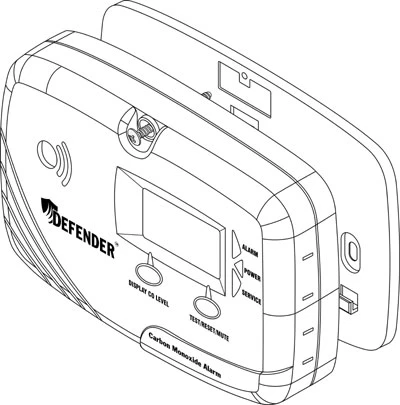
- Secure mounting: The mounting plate and retaining screw keep the monitor in place. The unit activates when slid onto its plate.
- Separate controls and status lights: Dedicated display memory and test/reset/mute buttons, power, alarm and service lights, self-diagnostics and end-of-life notification.
Display, Alert and Alarm Timing
The LL6270 responds to both concentration and time. Displaying a reading, flashing the alert light and sounding the horn are separate functions.
| CO level | Response | Timing |
|---|---|---|
| 5-500 ppm | Current level shown on display | Within 1 minute |
| 9-14 ppm | Red ALARM light flashes 4 times per minute (no horn) | Within 10 minutes |
| 15-24 ppm | Red light flashes; horn beeps 4 times per minute | Light when detected; horn within 60 minutes |
| 25-49 ppm | Horn and red light | Within 30 minutes |
| 50-99 ppm | Horn and red light | Within 15 minutes |
| 100-149 ppm | Horn and red light | Within 5 minutes |
| 150-500 ppm | Horn and red light; mute disabled | When detected |
| Above 500 ppm | Display flashes 500 PPM | When detected |
These are Defender's specified response points. Follow the owner's manual whenever a warning or alarm occurs. The table describes device behavior; it does not define a safe exposure level.
See It Tested: 50 PPM for 60 Minutes
We tested six carbon monoxide alarms and monitors at 50 ppm for 60 minutes. Watch to see which devices provided warnings and which remained silent, and why a listed alarm and a low-level monitor do different jobs.
Actual 60-minute test using 50 ppm NIST-traceable carbon monoxide calibration gas.
Which Defender Model Should You Buy?
Choose LL6270 when you want automatic low-level CO readings and warnings in addition to your residential CO alarm. Defender designed it for households with older adults, pregnant women, young children or people with medical conditions who may be more affected by lower CO levels.
Choose CA6150 when you need a UL-listed residential CO alarm with a digital readout. It can show low readings at a button press but does not warn automatically at low levels. View the Defender CA6150.
Choose the kit when you want both: a listed residential alarm plus low-level monitoring. View the CA6150 + LL6270 kit.
Technical Specifications
| Model / product type | Defender LL6270 / single-station low-level CO monitor |
|---|---|
| Listing | Not UL listed; supplements a UL-listed residential CO alarm |
| Sensor / sampling | Water-based electrochemical sensor with nuisance-gas filter / every 5 seconds |
| Automatic display range | 5-500 ppm |
| Display resolution | 1 ppm |
| Display accuracy | ±15%, plus ±2% each succeeding year, or 5 ppm, whichever is greater; specified from 20-500 ppm at 50% RH and 72°F ±5°F |
| Peak memory | Highest detected reading within the last 7 days, 5-500 ppm |
| Peak-duration memory | 1-999 minutes; total time within 10% of the peak |
| Audible signal | 85 dB at 10 feet; 4 beeps every 6 seconds for the first 5 minutes, then every 60 seconds (below 150 ppm) or every 20 seconds (150 ppm and above) |
| Power | Two factory-sealed, non-removable lithium batteries; up to five years of operation under normal conditions |
| Replacement | End-of-life signal after five years of operation; Defender recommends replacement every three years to maintain display accuracy |
| Warranty | Three-year limited factory warranty for monitor and batteries |
| Operating conditions | 40-100°F; 10-95% relative humidity |
| Instrument size / weight | 5½ × 3¾ × 1⅜ inches / 8 oz |
| Housing / manufacture | White flame-retardant ABS / Canada |
CO sensors lose sensitivity over time, which is why Defender recommends replacing the monitor every three years. Environmental conditions can also affect accuracy. Use in conditioned indoor locations; not suitable for hazardous locations as defined in the National Electrical Code. Full installation, testing and warranty instructions are in the manual.
Frequently Asked Questions
Why isn't the LL6270 UL listed, and can it replace my CO alarm?
UL 2034, the standard for residential CO alarms, does not allow listed alarms to automatically display or alarm below 30 ppm. The LL6270 is built to do exactly that, so it can't carry the listing. It does not replace a UL-listed alarm where code requires one. Install it alongside a listed alarm such as the CA6150.
Does it sound an alarm at 5 ppm?
No. At 5 ppm it only shows the reading on the display. The red light starts flashing at 9 ppm within 10 minutes, and the horn starts at 15 ppm within 60 minutes. See the timing table above for higher levels.
Why is the red light still flashing when the display reads 0 PPM?
Once the monitor detects 9 ppm or more, the red ALARM light keeps flashing as a record that low-level CO was present. It turns off automatically after the display reads 0 PPM for 7 days in a row. You can also stop it once the display reads 0 PPM by pressing Test/Reset/Mute or clearing the peak memory.
How do I check the peak reading?
Press the Display Memory button. The screen shows the highest CO level detected in the last 7 days (5-500 ppm), then how long that peak lasted (1-999 minutes), five seconds each. If it shows "--- PEAK," less than a minute of data has been collected; try again later. To clear the memory, press Display Memory, release, then press Test/Reset/Mute while the readings are showing. A long beep and "CLr" confirm it is cleared.
Can I mute the alarm?
It depends on the CO level. At 15-24 ppm, muting silences the horn for 8 hours. At 25-149 ppm, it silences the horn for 5 minutes. At 150 ppm and above, the alarm cannot be muted. In every case the red light keeps flashing, and the horn comes back if CO rises into a higher range.
Where should I install it?
Mount it on an interior wall about five feet off the floor, on every heated or air-conditioned level. Put one in or near every room people use, inside any room where someone sleeps with the door closed or where a more vulnerable person stays, and near the entry to any room with fuel-burning equipment. Avoid these locations:
- Within 5 feet of cooking appliances, furnaces, boilers, water heaters or space heaters
- Garages, dusty areas and rooms where cleaning or painting supplies are stored
- Bathrooms and laundry rooms, or within 3 feet of them
- Exterior walls, and areas below 40°F or above 100°F
- Within 1 foot of where a wall meets the ceiling or floor
- Within 1 foot of wireless devices
How do I test it, and how often?
Hold the Test/Reset/Mute button for at least 2 seconds. The monitor simulates about 100 ppm, beeps 4 times while the red light flashes, pauses, then repeats. Test it weekly, and again whenever the building has been empty for a while.
What should I do if the alarm sounds?
Press Test/Reset/Mute, call 911 or your fire department, and get everyone outside or to an open door or window. Stay there until responders arrive and the building has been aired out. If it goes off again within 24 hours, have a qualified technician inspect your fuel-burning appliances.
What do the chirps mean?
- One chirp per minute, green POWER light flashing, battery symbol on display: low battery. The monitor keeps working for up to about a month. Replace it.
- One chirp per minute, red SERVICE light, "End" on display: end of life after five years. Replace it.
- Two chirps per minute, red SERVICE light flashing, "Err" on display: internal fault. This signal cannot be muted. Contact warranty service.
How often should I replace it?
The end-of-life signal comes on after five years, but Defender recommends replacing the monitor every three years. CO sensors lose sensitivity over time, and replacing at three years keeps the display accurate. That also matches the three-year warranty.
Can I replace the batteries?
No. The two lithium cells are factory sealed with soldered connections. If the low-battery signal comes on within three years, move the monitor somewhere 68°F or warmer. If the signal returns within 24 hours, contact warranty service.
Can I use it in a garage, RV or vehicle?
Defender's instructions cover use inside buildings only and say to avoid garages, where vehicle exhaust will set it off. It is rated for 40-100°F, and use in unconditioned space is not covered by the warranty.
Manuals and Warranty
- Defender LL6270 Owner's Manual
- Defender LL6270 Quick Start Guide
- Defender Three-Year Limited Monitor Warranty